

Available on the Enterprise plan.
- Data sources — AWS Athena, Redshift, BigQuery, Snowflake, and any other driver that supports federated credentials.
- Export buckets — S3 and GCS buckets used for
EXPORT_BUCKETpre-aggregation unloads. OIDC covers Cube’s download of the unloaded objects; the warehouse’sUNLOADwrite still needs its own credentials configured on the client side — see the per-cloud guides for details. - Cube Store CSPS — a per-deployment S3, GCS, or Azure Blob Storage bucket that holds your Cube Store pre-aggregations (Customer-Supplied Pre-aggregation Storage).
- Bring-your-own LLM providers — AWS Bedrock, Google Vertex AI, and Azure OpenAI behind your own cloud account.
- Other cloud services — any cloud service that supports OIDC federation
that you’d like to access from the dynamic part of your data model
(
cube.py/cube.js, dynamic schema generators,checkAuth, custom pre-aggregation strategies, etc.) — works with the same token.
How it works
If you’re new to OpenID Connect, the OpenID Connect Core 1.0 specification is the canonical reference; the OAuth.com OIDC primer is a friendlier read. Cube’s implementation is a standard OIDC provider — anything that works with GitHub Actions OIDC, Vercel OIDC, or AWS IAM OIDC providers works the same way here. Each Cube tenant hosts a per-tenant OIDC issuer at its own domain, e.g.https://<tenant-name>.cubecloud.dev. The issuer publishes the standard OIDC discovery
endpoints, and Cube signs every token with a KMS-backed RS256 key.
The deployment never sees an access key or service account JSON. The cloud
SDKs inside Cube — AWS SDK, GCP google-auth-library, Azure SDK — pick up
the token automatically from a path supplied by Cube and exchange it with
the cloud’s own STS for short-lived credentials.
Endpoints served by Cube
Each tenant’s issuer URL ishttps://<tenant-name>.cubecloud.dev. Cube serves
the standard OIDC endpoints from that domain:
| Endpoint | Purpose |
|---|---|
/.well-known/openid-configuration | OIDC discovery document. Cloud providers fetch this to learn the issuer, supported algorithms, and JWKS location. |
/.well-known/jwks.json | JSON Web Key Set. Contains the public keys cloud providers use to verify token signatures. |
Token configs
A token config is a tenant-level entry that tells Cube which audience to mint tokens for and how to format thesub claim each token carries. Each
token config produces one audience-scoped JWT that is delivered to all
deployments in the tenant.
| Field | What it controls |
|---|---|
| Audience type | One of AWS, GCP, Azure, or Custom. AWS and Azure pre-fill the audience value. |
| Audience | The JWT aud claim value. Pre-set for AWS (sts.amazonaws.com) and Azure (api://AzureADTokenExchange). For GCP you supply the Workload Identity Federation provider resource path (//iam.googleapis.com/projects/.../providers/...) — there is no global GCP audience. User-supplied for Custom. |
| Name | A short, filesystem-safe slug that becomes part of the token file name (cube_cloud_token_<name>). |
| Subject Claim Format | Template for the JWT sub claim. Defaults to cube:deployment:{deployment_id} if left empty. |
| Custom Claims | Optional extra JWT claims emitted verbatim in every minted token — see Custom claims below. |
| Target Env Var | Custom audience type only: env var Cube populates with the token file path in every execution context — see Custom token configs below. |
Subject claim format
Thesub claim is what the receiving cloud provider’s trust policy matches
on to decide which deployment or component is allowed to assume a role.
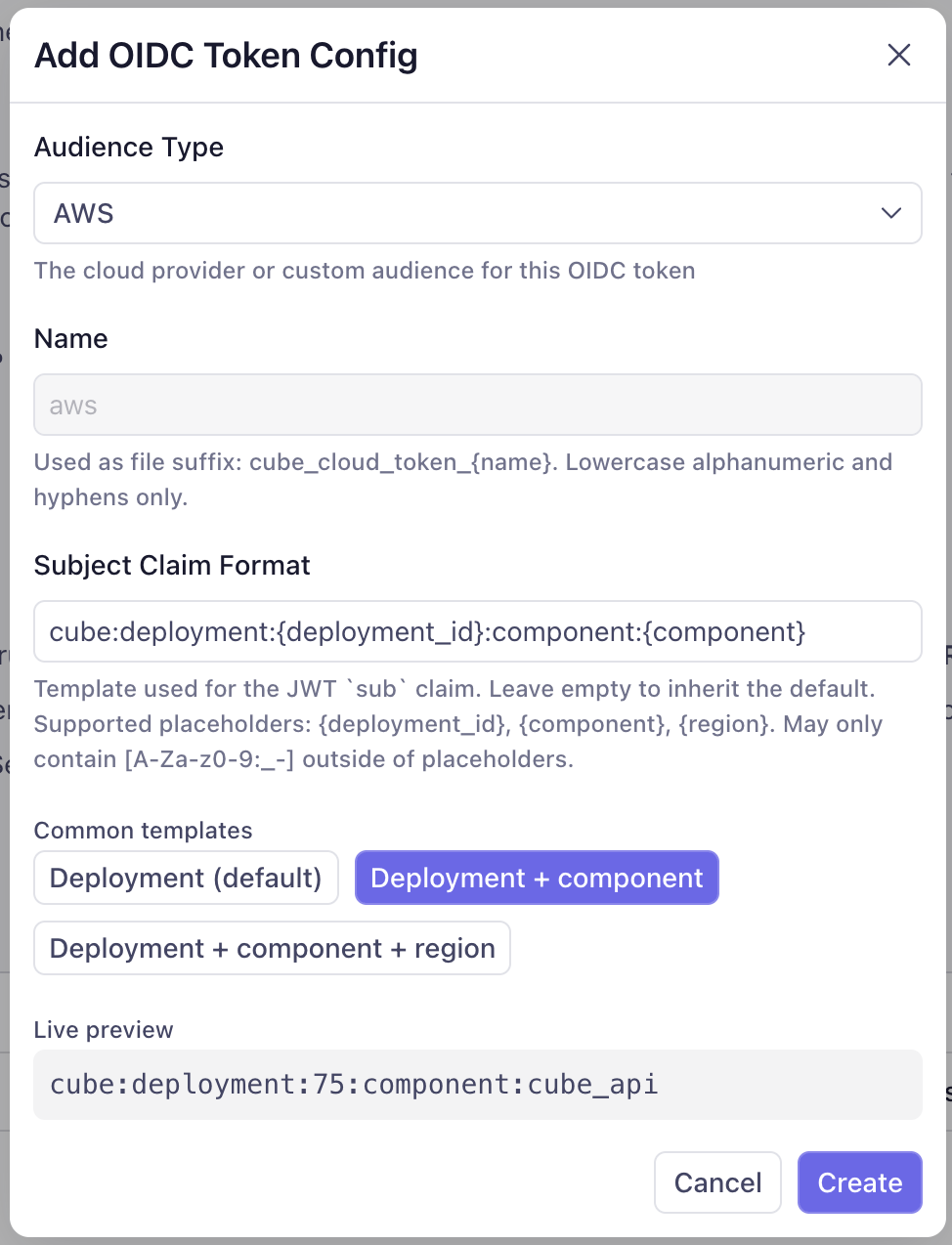
Cube’s default template is cube:deployment:{deployment_id} — sufficient if
you only need to identify the deployment.
To scope further — by component (Cube API vs. Cube Store vs. the AI Engineer)
or by Cube Cloud region — override the template with one of the Common
templates the dialog offers:
cube:deployment:{deployment_id}(default)cube:deployment:{deployment_id}:component:{component}cube:deployment:{deployment_id}:component:{component}:region:{region}
| Placeholder | What it resolves to |
|---|---|
{deployment_id} | The deployment’s numeric ID. Substitutes to the literal global for tenant-scoped tokens (e.g., AI Engineer running in the control plane). |
{component} | The component requesting the token: cube_api, cube_store, or ai_engineer. Substitutes to global when no component context is set. |
{region} | The deployment’s Cube Cloud region. For tenant-scoped tokens minted in the control plane, substitutes to the literal control-plane. |
cube_api (the Cube API, refresh
worker, dev-mode pods, Cold Start Workers, etc.), cube_store (Cube Store),
and ai_engineer (the AI Engineer service, used for BYO LLM auth).
Outside of placeholders, the template may contain only the characters
[A-Za-z0-9:_-]. Anything else is rejected at save time.
Subject claim format changes can take up to one hour to fully propagate.
Already-minted tokens are cached at several layers — the credentials broker
sidecar and the cloud SDKs’ own STS-credential caches — and remain valid
until their TTL expires (up to 1h). Plan trust-policy rollouts so the new
sub shape is accepted before the old one stops being honored, and expect
a window where both formats are in flight.Custom claims
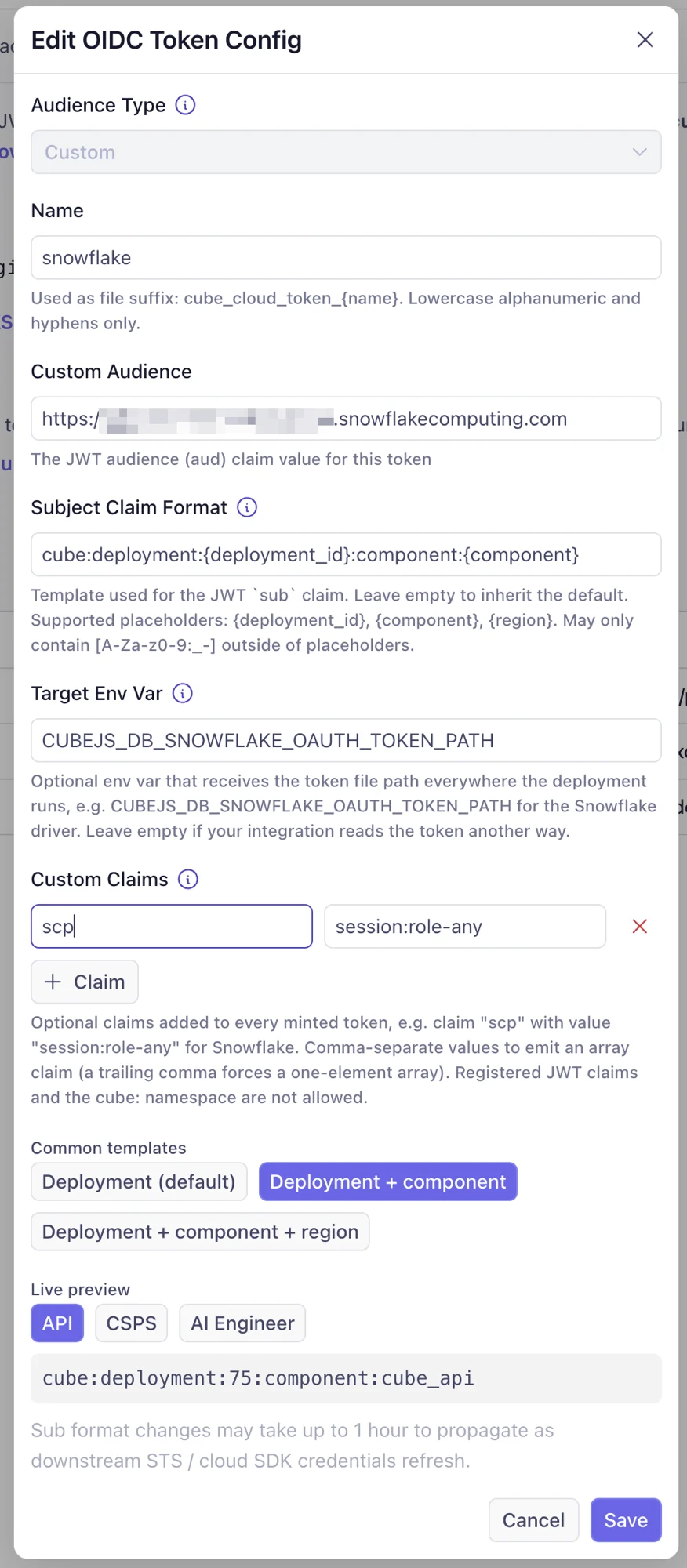
Some token consumers authorize through claims beyondiss/sub/aud. The
canonical example is Snowflake External OAuth, which
grants session roles exclusively through the scp claim — a token without
it authenticates but fails role authorization. The Custom Claims field
on a token config adds such claims to every token minted for that audience.
Each claim is a name plus a value. Values are emitted as strings; to emit
an array claim, comma-separate the values (a trailing comma forces a
one-element array). For example, claim scp with value session:role-any
covers the Snowflake case.
Custom claims are deliberately constrained:
- The registered JWT claims (
iss,sub,aud,exp,iat,nbf,jti) and anything under thecube:namespace cannot be overridden — those carry the token’s identity semantics and stay authoritative. - Values are strings or arrays of strings only, with bounded lengths.
Custom token configs
ForCustom audiences, the driver or SDK on the other side reads the token
from a file. Where that file lives depends on where the deployment is
running — deployed pods, a dev-mode worker, and a test-connection probe
each keep it in a different place — so the path must never be hard-coded.
The Target Env Var field solves this: name the env var the consumer
reads (e.g. CUBEJS_DB_SNOWFLAKE_OAUTH_TOKEN_PATH for the Snowflake
driver), and Cube sets it to the correct token-file path in every context.
Leave CUBEJS_DB_USER / CUBEJS_DB_PASS (or the equivalent secret) unset
and don’t write the path by hand. Well-known audiences (AWS/GCP/Azure)
don’t need this — their SDKs read fixed, standard env vars that Cube
already populates.
The example below — a custom config for the Snowflake driver — combines
both fields: a scp custom claim (which Snowflake requires for role
authorization) and a Target Env Var of CUBEJS_DB_SNOWFLAKE_OAUTH_TOKEN_PATH.
The Snowflake data source page walks through the full setup.
Trust mechanism
The receiving system trusts Cube tokens by referencing two things:- The issuer URL —
https://<tenant-name>.cubecloud.dev. The cloud provider fetches your tenant’s JWKS from this URL and uses it to validate every token signature. As long as Cube holds the matching private key, tokens issued for your tenant verify; tokens issued by any other Cube tenant do not. - The subject claim —
sub. The trust policy on the receiving side matches thesubexactly (or with wildcards) against the format you configured above to decide which deployments / components are allowed in.
Token lifecycle
| Property | Value |
|---|---|
| Algorithm | RS256 |
| TTL | 1 hour |
| Refresh | Automatic — Cube re-mints each token before it expires and atomically replaces the token file. The cloud SDK on the other side picks up the new token without reconnecting. |
| Signing keys | Per-tenant, KMS-backed. Rotated regularly; the JWKS endpoint always serves the current and previous public keys so in-flight tokens remain valid across rotations. |
| Revocation | TTL-based. Emergency revocation is performed by rotating the signing key, which invalidates all tokens within the next TTL window. |
Enabling OIDC for your tenant
Workload identity is configured at the tenant level under Admin → OIDC. From there, you turn the issuer on and create one token config per integration target.Enable the OIDC issuer
In Admin → OIDC, flip the OIDC token issuance is active for all
deployments switch to on. This activates the discovery and JWKS
endpoints on your tenant URL and unlocks the deployment-level OIDC
settings everywhere else in the UI. Click OpenID Configuration or
JWKS Endpoint to grab the URLs you’ll hand to your cloud provider
when configuring federation.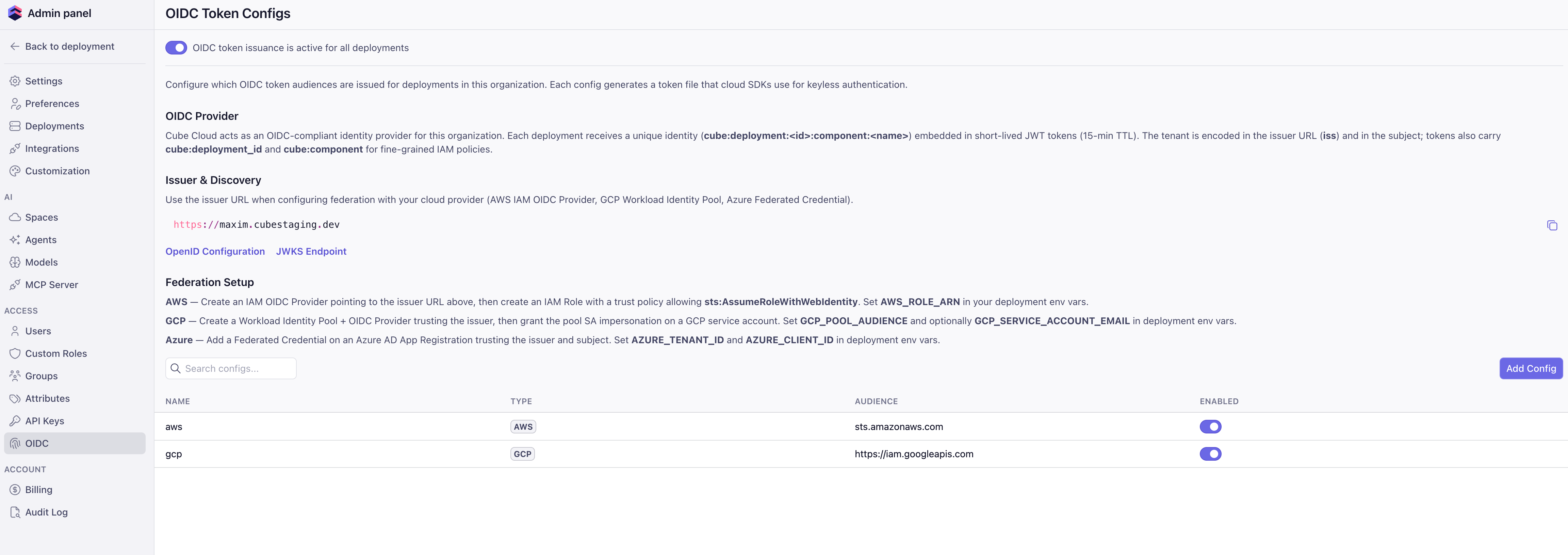
Add token configs
Click Add Config and pick the audience type. For
AWS and Azure,
the audience auto-fills with the standard value. For GCP, enter the
Workload Identity Federation provider resource path (the same
//iam.googleapis.com/projects/.../providers/... value you use for
GCP_POOL_AUDIENCE) — GCP has no global audience. For Custom, enter the
audience your target system expects. Optionally set the Subject Claim
Format — see Token configs for the available templates.Configure trust on the cloud side
Follow the cloud-specific guides below to register Cube as an OIDC
provider on the system you want Cube to access, create a role / service
account / app registration, and write a trust policy that pins the
issuer URL and the subject pattern.


Amazon Web Services
Athena, S3 export buckets, Bedrock, and any other AWS-IAM-protected service.
Google Cloud Platform
BigQuery, GCS export buckets, and any other GCP service via Workload Identity Federation.
Microsoft Azure
Azure SQL, Blob Storage export buckets, and any other Azure service via federated credentials.
Set deployment identity environment variables
For each deployment, set the cloud-specific “who to become” env vars
under Settings → Environment variables. These point Cube at the
role or service account it should assume on your side:
These are the default identity for the deployment — see below.
| Cloud | Env vars |
|---|---|
| AWS | AWS_ROLE_ARN |
| GCP | GCP_POOL_AUDIENCE, GCP_SERVICE_ACCOUNT_EMAIL |
| Azure | AZURE_TENANT_ID, AZURE_CLIENT_ID |
Default identity for a deployment
When you setAWS_ROLE_ARN (or the GCP / Azure equivalents) on a deployment,
that role becomes the default cloud identity for everything that runs inside
that deployment:
- Drivers that follow the AWS / GCP / Azure default credential chain (Athena, Redshift, BigQuery, RDS Postgres / MySQL with IAM auth, Azure SQL, and more) automatically authenticate as this role / service account.
- Pre-aggregation export bucket I/O uses the same identity to write to S3 / GCS / Blob Storage.
- Code in your data model —
dataSourcefactories,driverFactory,extendContext,checkAuth, dynamic schema generators — runs with the same default identity. If you instantiate an AWS / GCP / Azure SDK client with no explicit credentials, it picks up the deployment’s OIDC token automatically.
AssumeRole / impersonation hop and connect as the downstream principal.
| Driver | Driver-specific assume-role env var |
|---|---|
| AWS Athena | CUBEJS_AWS_ATHENA_ASSUME_ROLE_ARN |
| AWS Redshift | CUBEJS_DB_AWS_ROLE_ARN |
| Other AWS drivers | Driver-specific — see the driver page in Connect to data. |
Cube Store CSPS
Cube Store can store its pre-aggregations in a per-deployment S3, GCS, or Azure Blob Storage bucket that you own — Customer-Supplied Pre-aggregation Storage (CSPS). When you enable CSPS for a deployment, Cube Store authenticates to your bucket with the same OIDC machinery as the rest of the deployment. The trust policy (AWS IAM role / Azure federated credential) pins thesub claim to cube:deployment:<deployment-id>:component:cube_store,
giving Cube Store its own identity that’s distinct from the Cube API.
CSPS is configured under Settings → Pre-Aggregation Storage on the
deployment. See
AWS,
GCP, and
Azure for the
trust policy shape on each cloud.
Audit trail
Every token Cube issues is recorded in the tenant audit log with the deployment ID, component, audience, and TTL. On the receiving side, the cloud’s own audit trail shows the federation event:- AWS CloudTrail —
AssumeRoleWithWebIdentityevents with the deployment subject. - GCP Cloud Audit Logs — Workload Identity Federation token-exchange and service-account-impersonation events.
- Azure Activity Log — Federated-credential sign-in events on the app registration.